
 星河
星河下面是一段python 代码,运行之后会出现一个图片压缩程序:
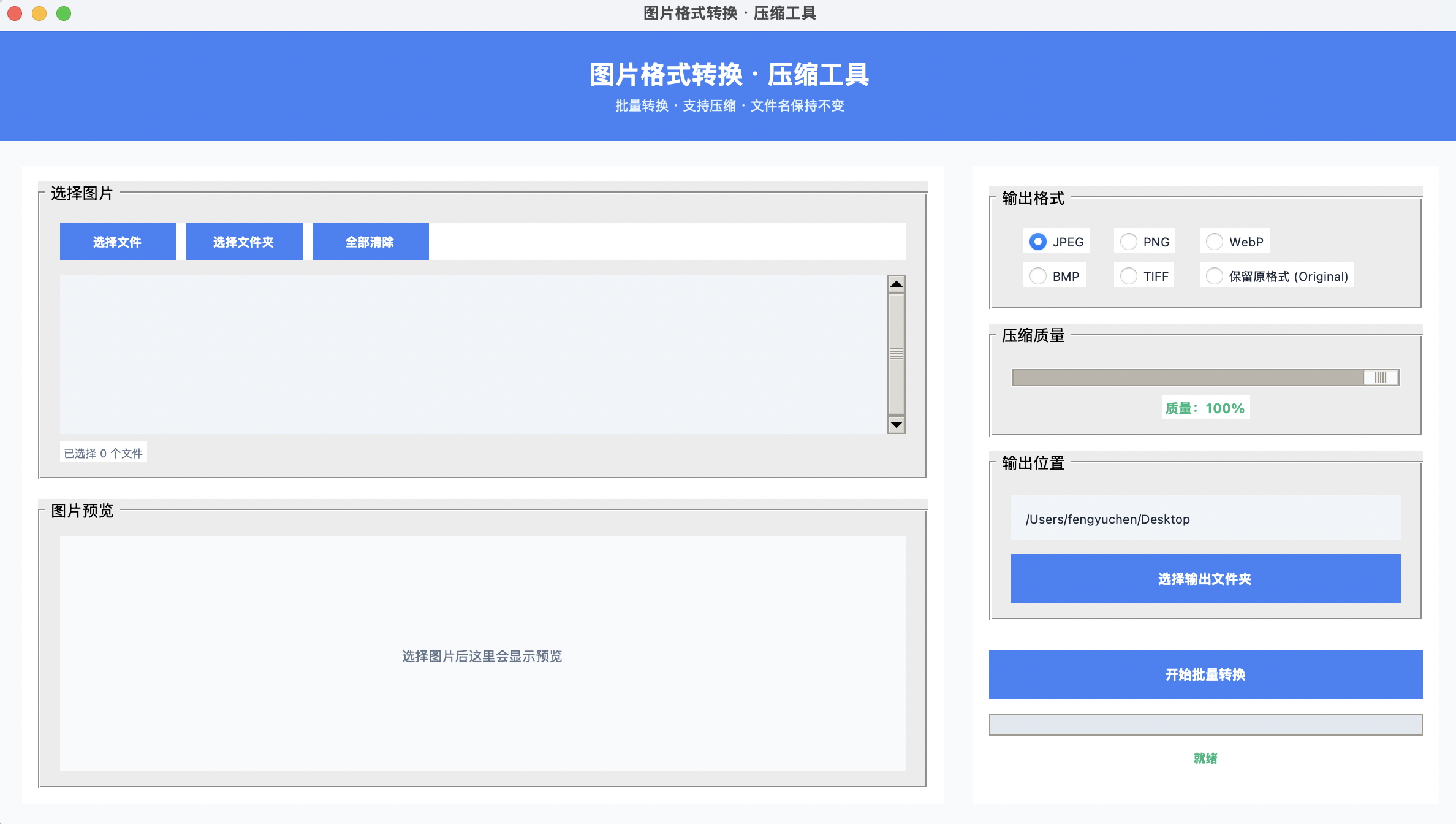
使用前请确保安装过以下几个库:
- tkinter
- PIL
- os
- threading
- pathlib
- json
- datetime
- concurrent
完整代码如下,复制到.py 文件里即可运行:
import tkinter as tk
from tkinter import ttk, filedialog, messagebox
from PIL import Image, ImageTk
import os
import threading
from pathlib import Path
import json
from datetime import datetime
from concurrent.futures import ThreadPoolExecutor, as_completed
class ImageConverterApp:
def __init__(self, root):
self.root = root
self.root.title("图片格式转换 · 压缩工具")
self.root.geometry("960x720")
self.root.configure(bg="#f8fafc")
self.root.resizable(True, True)
# 现代配色方案
self.colors = {
"bg": "#f8fafc",
"surface": "#ffffff",
"primary": "#3b82f6",
"primary_dark": "#2563eb",
"primary_light": "#60a5fa",
"accent": "#8b5cf6",
"success": "#10b981",
"warning": "#f59e0b",
"danger": "#ef4444",
"text": "#1e293b",
"text_secondary": "#64748b",
"border": "#e2e8f0",
"hover": "#eff6ff",
}
self.selected_files = []
self.output_dir = ""
self.is_converting = False
self.create_style()
self.create_widgets()
self.load_settings()
self.root.protocol("WM_DELETE_WINDOW", self.on_closing)
def create_style(self):
style = ttk.Style()
style.theme_use('clam')
style.configure(".", font=("Segoe UI", 10), background=self.colors["bg"])
style.configure("TButton",
font=("Segoe UI", 10, "bold"),
padding=8,
background=self.colors["primary"],
foreground="white",
borderwidth=0)
style.map("TButton",
background=[("active", self.colors["primary_dark"]),
("pressed", self.colors["primary_dark"])])
style.configure("Accent.TButton",
font=("Segoe UI", 11, "bold"),
padding=12,
background=self.colors["primary"])
style.map("Accent.TButton",
background=[("active", self.colors["primary_dark"])])
style.configure("Horizontal.TProgressbar",
thickness=10,
troughcolor=self.colors["border"],
background=self.colors["primary"])
style.configure("TLabelframe",
background=self.colors["surface"],
relief="flat",
borderwidth=1,
bordercolor=self.colors["border"])
style.configure("TLabelframe.Label",
font=("Segoe UI", 11, "bold"),
foreground=self.colors["text"],
background=self.colors["surface"])
def create_widgets(self):
header = tk.Frame(self.root, bg=self.colors["primary"], height=90)
header.pack(fill=tk.X)
header.pack_propagate(False)
tk.Label(header,
text="图片格式转换 · 压缩工具",
font=("Segoe UI", 22, "bold"),
bg=self.colors["primary"],
fg="white").pack(pady=(18, 0))
tk.Label(header,
text="批量转换 · 支持压缩 · 文件名保持不变",
font=("Segoe UI", 11),
bg=self.colors["primary"],
fg="#e0f2fe").pack()
content = tk.Frame(self.root, bg=self.colors["bg"])
content.pack(fill=tk.BOTH, expand=True, padx=20, pady=20)
left = tk.Frame(content, bg=self.colors["surface"], bd=1, relief="flat")
left.pack(side=tk.LEFT, fill=tk.BOTH, expand=True, padx=(0, 12))
select_panel = tk.LabelFrame(left, text=" 选择图片 ", padx=16, pady=12)
select_panel.pack(fill=tk.X, padx=12, pady=(12, 0))
btn_frame = tk.Frame(select_panel, bg=self.colors["surface"])
btn_frame.pack(fill=tk.X, pady=(4, 12))
ttk.Button(btn_frame, text="选择文件", command=self.select_files).pack(side=tk.LEFT, padx=(0, 8))
ttk.Button(btn_frame, text="选择文件夹", command=self.select_folder).pack(side=tk.LEFT, padx=(0, 8))
ttk.Button(btn_frame, text="全部清除", command=self.clear_selection).pack(side=tk.LEFT)
list_frame = tk.Frame(select_panel, bg=self.colors["surface"])
list_frame.pack(fill=tk.BOTH, expand=True)
scrollbar = ttk.Scrollbar(list_frame)
scrollbar.pack(side=tk.RIGHT, fill=tk.Y)
self.file_listbox = tk.Listbox(
list_frame,
yscrollcommand=scrollbar.set,
font=("Segoe UI", 10),
bg="#f1f5f9",
fg=self.colors["text"],
selectbackground=self.colors["primary_light"],
selectforeground="white",
relief="flat",
highlightthickness=0,
bd=0,
height=10
)
self.file_listbox.pack(fill=tk.BOTH, expand=True)
scrollbar.config(command=self.file_listbox.yview)
self.file_count_label = tk.Label(
select_panel,
text="已选择 0 个文件",
bg=self.colors["surface"],
fg=self.colors["text_secondary"],
font=("Segoe UI", 9)
)
self.file_count_label.pack(anchor=tk.W, pady=(6, 0))
preview_panel = tk.LabelFrame(left, text=" 图片预览 ", padx=16, pady=12)
preview_panel.pack(fill=tk.BOTH, expand=True, padx=12, pady=(16, 12))
self.preview_canvas = tk.Canvas(
preview_panel,
bg="#f8fafc",
highlightthickness=0,
relief="flat"
)
self.preview_canvas.pack(fill=tk.BOTH, expand=True)
self.preview_placeholder = tk.Label(
self.preview_canvas,
text="选择图片后这里会显示预览",
bg="#f8fafc",
fg=self.colors["text_secondary"],
font=("Segoe UI", 11, "italic")
)
self.preview_placeholder.place(relx=0.5, rely=0.5, anchor="center")
self.file_listbox.bind('<<ListboxSelect>>', self.show_preview)
right = tk.Frame(content, bg=self.colors["surface"], width=380, bd=1, relief="flat")
right.pack(side=tk.RIGHT, fill=tk.Y, padx=(12, 0))
right.pack_propagate(False)
fmt_frame = tk.LabelFrame(right, text=" 输出格式 ", padx=16, pady=12)
fmt_frame.pack(fill=tk.X, padx=12, pady=(16, 0))
self.format_var = tk.StringVar(value="JPEG")
formats = ["JPEG", "PNG", "WebP", "BMP", "TIFF", "保留原格式 (Original)"]
for i, fmt in enumerate(formats):
rb = tk.Radiobutton(
fmt_frame,
text=fmt,
variable=self.format_var,
value=fmt,
bg=self.colors["surface"],
font=("Segoe UI", 10),
fg=self.colors["text"],
selectcolor=self.colors["hover"],
activebackground=self.colors["hover"],
command=self.on_format_change
)
rb.grid(row=i//3, column=i%3, sticky="w", padx=10, pady=4)
quality_frame = tk.LabelFrame(right, text=" 压缩质量 ", padx=16, pady=12)
quality_frame.pack(fill=tk.X, padx=12, pady=12)
self.quality_var = tk.IntVar(value=82)
scale = ttk.Scale(
quality_frame,
from_=10,
to=100,
orient=tk.HORIZONTAL,
variable=self.quality_var,
length=320,
command=self.update_quality_label
)
scale.pack(fill=tk.X, pady=(6, 0))
self.quality_value_label = tk.Label(
quality_frame,
text="质量:82%",
bg=self.colors["surface"],
fg=self.colors["primary"],
font=("Segoe UI", 11, "bold")
)
self.quality_value_label.pack(pady=(6, 0))
out_frame = tk.LabelFrame(right, text=" 输出位置 ", padx=16, pady=12)
out_frame.pack(fill=tk.X, padx=12, pady=0)
self.output_path_label = tk.Label(
out_frame,
text="尚未选择输出文件夹",
bg="#f1f5f9",
fg=self.colors["text_secondary"],
font=("Segoe UI", 10),
wraplength=340,
justify="left",
anchor="w",
padx=10, pady=10,
relief="flat"
)
self.output_path_label.pack(fill=tk.X, pady=(6, 12))
ttk.Button(out_frame, text="选择输出文件夹", command=self.select_output_dir,
style="Accent.TButton").pack(fill=tk.X)
ttk.Button(right, text="开始批量转换", command=self.start_conversion,
style="Accent.TButton").pack(fill=tk.X, padx=12, pady=(24, 12))
self.progress_var = tk.DoubleVar()
self.progress_bar = ttk.Progressbar(
right, variable=self.progress_var, maximum=100, mode='determinate')
self.progress_bar.pack(fill=tk.X, padx=12, pady=(0, 8))
self.status_label = tk.Label(
right,
text="就绪",
bg=self.colors["surface"],
fg=self.colors["success"],
font=("Segoe UI", 10, "bold")
)
self.status_label.pack(pady=(0, 16))
footer = tk.Frame(self.root, bg=self.colors["primary_dark"], height=34)
footer.pack(fill=tk.X, side=tk.BOTTOM)
footer.pack_propagate(False)
tk.Label(footer,
text="支持 JPG PNG WebP BMP TIFF 格式(可保留原格式,文件名不变)",
bg=self.colors["primary_dark"],
fg="#bfdbfe",
font=("Segoe UI", 9)).pack(side=tk.LEFT, padx=16, pady=6)
tk.Label(footer,
text="v1.4 • 文件名保持原样",
bg=self.colors["primary_dark"],
fg="#bfdbfe",
font=("Segoe UI", 9)).pack(side=tk.RIGHT, padx=16)
def start_conversion(self):
if not self.selected_files:
messagebox.showwarning("提示", "请先选择图片")
return
if not self.output_dir:
messagebox.showwarning("提示", "请选择输出文件夹")
return
if self.is_converting:
messagebox.showinfo("提示", "正在转换中,请稍候...")
return
self.is_converting = True
self.convert_btn_state("disabled", "转换中...")
self.status_label.config(text="正在准备多线程转换...", fg=self.colors["primary"])
self.progress_var.set(0)
threading.Thread(target=self.run_multi_thread_conversion, daemon=True).start()
def run_multi_thread_conversion(self):
total = len(self.selected_files)
selected_format = self.format_var.get()
quality = self.quality_var.get()
max_workers = min(total, (os.cpu_count() or 4) * 2)
success = 0
failed = []
with ThreadPoolExecutor(max_workers=max_workers) as executor:
future_to_file = {
executor.submit(self.convert_single_image, src, selected_format, quality): src
for src in self.selected_files
}
completed = 0
for future in as_completed(future_to_file):
completed += 1
src = future_to_file[future]
try:
success_flag, error = future.result()
if success_flag:
success += 1
else:
failed.append((os.path.basename(src), error))
except Exception as e:
failed.append((os.path.basename(src), str(e)))
progress = completed / total * 100
self.root.after(0, self.progress_var.set, progress)
self.root.after(0, lambda c=completed, t=total: self.status_label.config(
text=f"处理中:{c}/{t}", fg=self.colors["primary"]))
self.root.after(0, self.conversion_done, success, total, failed)
self.is_converting = False
def convert_single_image(self, src_path, selected_format, quality):
"""单个图片转换,返回 (是否成功, 错误信息 or None)"""
try:
img = Image.open(src_path)
original_filename = os.path.basename(src_path)
original_ext = os.path.splitext(original_filename)[1].lower()
base_name = os.path.splitext(original_filename)[0]
# 确定最终扩展名
if selected_format == "保留原格式 (Original)":
final_ext = original_ext
final_format = original_ext.upper().lstrip('.')
use_quality = final_format in ["JPEG", "JPG", "WEBP"]
else:
final_ext = f".{selected_format.lower()}"
final_format = selected_format.upper() if selected_format != "WebP" else "WEBP"
use_quality = final_format in ["JPEG", "WEBP"]
# 输出路径:文件名不变,只改扩展名
out_filename = base_name + final_ext
out_path = os.path.join(self.output_dir, out_filename)
# 如果文件已存在,直接覆盖(符合“文件名不要变”的要求)
save_params = {}
if use_quality:
save_params["quality"] = quality
if final_format == "JPEG":
if img.mode in ("RGBA", "LA", "P"):
bg = Image.new("RGB", img.size, (255, 255, 255))
if img.mode == "P":
img = img.convert("RGBA")
bg.paste(img, mask=img.split()[-1] if img.mode == "RGBA" else None)
img = bg
save_params["optimize"] = True
img.save(out_path, "JPEG", **save_params)
elif final_format == "PNG":
save_params["optimize"] = True
img.save(out_path, "PNG", **save_params)
elif final_format == "WEBP":
img.save(out_path, "WEBP", **save_params)
else:
# BMP, TIFF 等
img.save(out_path, final_format)
return True, None
except Exception as e:
return False, str(e)
def conversion_done(self, success, total, failed):
self.progress_var.set(100)
self.convert_btn_state("normal")
self.status_label.config(text=f"完成:{success}/{total}", fg=self.colors["success"])
if failed:
msg = f"成功 {success} / {total}\n\n失败文件(前5个):\n"
msg += "\n".join([f"• {name}: {err}" for name, err in failed[:5]])
if len(failed) > 5:
msg += f"\n... 还有 {len(failed)-5} 个失败"
messagebox.showwarning("转换结果", msg)
else:
messagebox.showinfo("完成", f"全部 {success} 张图片转换成功!\n输出目录:{self.output_dir}")
self.save_settings()
self.root.after(2500, lambda: self.progress_var.set(0))
def convert_btn_state(self, state, text="开始批量转换"):
def update():
for widget in self.root.winfo_children():
if isinstance(widget, tk.Frame):
for child in widget.winfo_children():
if isinstance(child, tk.Frame):
for sub in child.winfo_children():
if isinstance(sub, ttk.Button) and "转换" in sub["text"]:
sub.config(state=state, text=text)
self.root.after(0, update)
def select_files(self):
filetypes = [
("图片文件", "*.jpg *.jpeg *.png *.bmp *.tiff *.webp"),
("所有文件", "*.*")
]
files = filedialog.askopenfilenames(title="选择图片", filetypes=filetypes)
if files:
self.selected_files = list(files)
self.update_file_list()
def select_folder(self):
folder = filedialog.askdirectory(title="选择图片文件夹")
if folder:
exts = ('.jpg', '.jpeg', '.png', '.bmp', '.tiff', '.webp')
self.selected_files = []
for root, _, files in os.walk(folder):
for file in files:
if file.lower().endswith(exts):
self.selected_files.append(os.path.join(root, file))
if self.selected_files:
self.update_file_list()
else:
messagebox.showwarning("提示", "所选文件夹中没有找到支持的图片")
def update_file_list(self):
self.file_listbox.delete(0, tk.END)
for path in self.selected_files:
name = os.path.basename(path)
try:
size_kb = os.path.getsize(path) // 1024
size_str = f" ({size_kb:,} KB)"
except:
size_str = ""
self.file_listbox.insert(tk.END, name + size_str)
self.file_count_label.config(text=f"已选择 {len(self.selected_files)} 个文件")
self.status_label.config(text=f"已加载 {len(self.selected_files)} 张图片")
def clear_selection(self):
self.selected_files = []
self.file_listbox.delete(0, tk.END)
self.file_count_label.config(text="已选择 0 个文件")
self.preview_placeholder.place(relx=0.5, rely=0.5, anchor="center")
self.status_label.config(text="已清除选择")
def show_preview(self, event):
selection = self.file_listbox.curselection()
if not selection:
return
index = selection[0]
if index >= len(self.selected_files):
return
file_path = self.selected_files[index]
try:
img = Image.open(file_path)
canvas_w = self.preview_canvas.winfo_width()
canvas_h = self.preview_canvas.winfo_height()
if canvas_w < 2 or canvas_h < 2:
canvas_w, canvas_h = 320, 240
ratio = min(canvas_w * 0.9 / img.width, canvas_h * 0.9 / img.height)
new_w = int(img.width * ratio)
new_h = int(img.height * ratio)
img_resized = img.resize((new_w, new_h), Image.Resampling.LANCZOS)
photo = ImageTk.PhotoImage(img_resized)
self.preview_canvas.delete("all")
self.preview_placeholder.place_forget()
self.preview_canvas.create_image(canvas_w//2, canvas_h//2, image=photo, anchor="center")
self.preview_canvas.image = photo
info = f"{os.path.basename(file_path)}\n{img.width} × {img.height}"
self.preview_canvas.create_text(canvas_w//2, canvas_h-20, text=info,
fill=self.colors["text"], font=("Segoe UI", 9))
except Exception as e:
messagebox.showerror("预览失败", str(e))
def on_format_change(self):
fmt = self.format_var.get()
if fmt == "保留原格式 (Original)":
self.status_label.config(text="将保留每张图片的原始格式和文件名")
else:
self.status_label.config(text=f"格式:{fmt}(文件名保持原样)")
def update_quality_label(self, value):
val = int(float(value))
self.quality_value_label.config(text=f"质量:{val}%")
if val >= 90:
color = self.colors["success"]
elif val >= 70:
color = self.colors["warning"]
else:
color = self.colors["danger"]
self.quality_value_label.config(fg=color)
def select_output_dir(self):
dir_path = filedialog.askdirectory(title="选择输出文件夹")
if dir_path:
self.output_dir = dir_path
self.output_path_label.config(text=dir_path, fg=self.colors["text"])
self.status_label.config(text="输出目录已设置")
def load_settings(self):
file = Path.home() / ".imgconv_settings.json"
if file.exists():
try:
with open(file, encoding="utf-8") as f:
data = json.load(f)
if "output_dir" in data and os.path.exists(data["output_dir"]):
self.output_dir = data["output_dir"]
self.output_path_label.config(text=data["output_dir"], fg=self.colors["text"])
if "format" in data:
self.format_var.set(data["format"])
if "quality" in data:
self.quality_var.set(data["quality"])
self.update_quality_label(data["quality"])
except:
pass
def save_settings(self):
data = {
"output_dir": self.output_dir,
"format": self.format_var.get(),
"quality": self.quality_var.get(),
"last_used": datetime.now().isoformat()
}
file = Path.home() / ".imgconv_settings.json"
try:
with open(file, "w", encoding="utf-8") as f:
json.dump(data, f, indent=2, ensure_ascii=False)
except:
pass
def on_closing(self):
self.save_settings()
self.root.destroy()
if __name__ == "__main__":
root = tk.Tk()
app = ImageConverterApp(root)
root.mainloop()